Manage Delegate Access Control on Protected Emails in Outlook using PowerShell
Manage delegate access control on protected emails in Exchange Online using PowerShell. Block or allow delegates from reading IRM-protected messages in delegated mailboxes and shared mailboxes. Use Get-MailboxIRMAccess, Set-MailboxIRMAccess, and Remove-MailboxIRMAccess cmdlets for granular encrypted content access.
Microsoft 365 provides an option to control access on protected emails, such as emails protected by MIP sensitivity labels or RMS protected emails for delegates and shared mailbox members.
Even though the feature exists already, it has a few inconsistencies. When a delegate has full access to the mailbox, the delegate can access encrypted emails based on the Outlook client they are using.
Delegate access: Delegates can view encrypted emails in Outlook on the web (OWA), Outlook for Mac, Outlook for iOS, Outlook for Android, and Mail app on Windows. In Outlook for Windows, the delegate must be in To, Cc, or Bcc to read encrypted messages.
Shared mailbox access: When a delegate has full access to a shared mailbox, they can open encrypted messages in Outlook clients, such as OWA, iOS, Android, Mac, and Mail app on Windows. For Outlook for Windows, the delegate must have the ‘Full access’ rights and ‘AutoMapping’ parameter set to $true.
With the new update, Outlook will provide consistent access control on encrypted emails for delegates and shared mailbox members.
Also, Microsoft has introduced 3 new PowerShell cmdlets to manage granular access control of encrypted content. You must connect to Exchange Online PowerShell to use these cmdlets.
- Get-MailboxIRMAccess – To check who is blocked from accessing mailbox/shared mailbox’s encrypted messages.
|
1 |
Get-MailboxIRMAccess -Identity [email protected] |
This example returns Full access delegates who are blocked from reading IRM-protected messages in John’s mailbox.
- Set-MailboxIRMAccess – To block delegate from reading encrypted messages from delegated mailbox or shared mailbox.
|
1 |
Set-MailboxIRMAccess -Identity [email protected] -User [email protected] -AccessLevel Block |
This example prevents delegate Chris from reading IRM-protected messages in John’s mailbox.
- Remove-MailboxIRMAccess – To unblock delegate access and allow them to read IRM-protected messages.
|
1 |
Remove-MailboxIRMAccess -Identity [email protected] -User [email protected] |
The above example unblocks Chris and allows him to read encrypted emails from John’s mailbox.
Parameter definitions:
- Identity – Identity of the target mailbox. It represents the delegated mailbox with a unique id, such as UPN, primary email address, GUID, etc.
- AccessLevel – Specifies what delegates can do to IRM-protected messages in the mailbox. Currently, it supports ’Block’ only.
- User –Specifies the delegate or shared mailbox member who has full access to the delegated mailbox.
Things to be Noted:
- After any of the above mailbox settings are changed, the Outlook client must be restarted.
- The new block setting does not affect Outlook for Windows as it already has options to block access control om encrypted emails, as said earlier.
When Will this Feature be Available?
The delegate access control on protected emails feature is rolling out now.
- Preview: Microsoft is rolling out the preview in early June
- Standard: Microsoft will begin rolling out in early July and expect to complete it by late August.
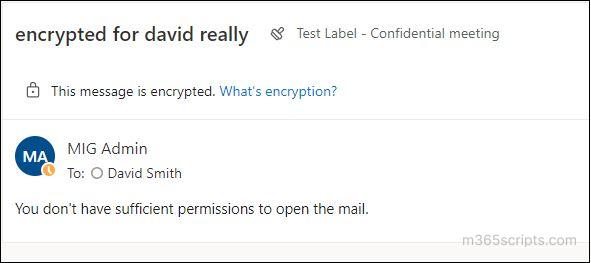
If a delegate is blocked to view the owner mailbox’s encrypted email, the delegate will see the following when they open it.
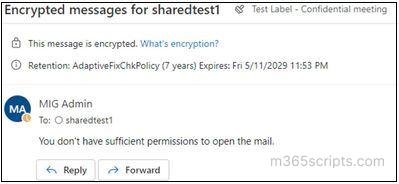
If a shared mailbox member is blocked from viewing protected email in the mailbox, the user will see the following when they try to open protected emails.
We hope the new setting to ‘block the owner’s protected email access’ helps improve email security and protect sensitive content.